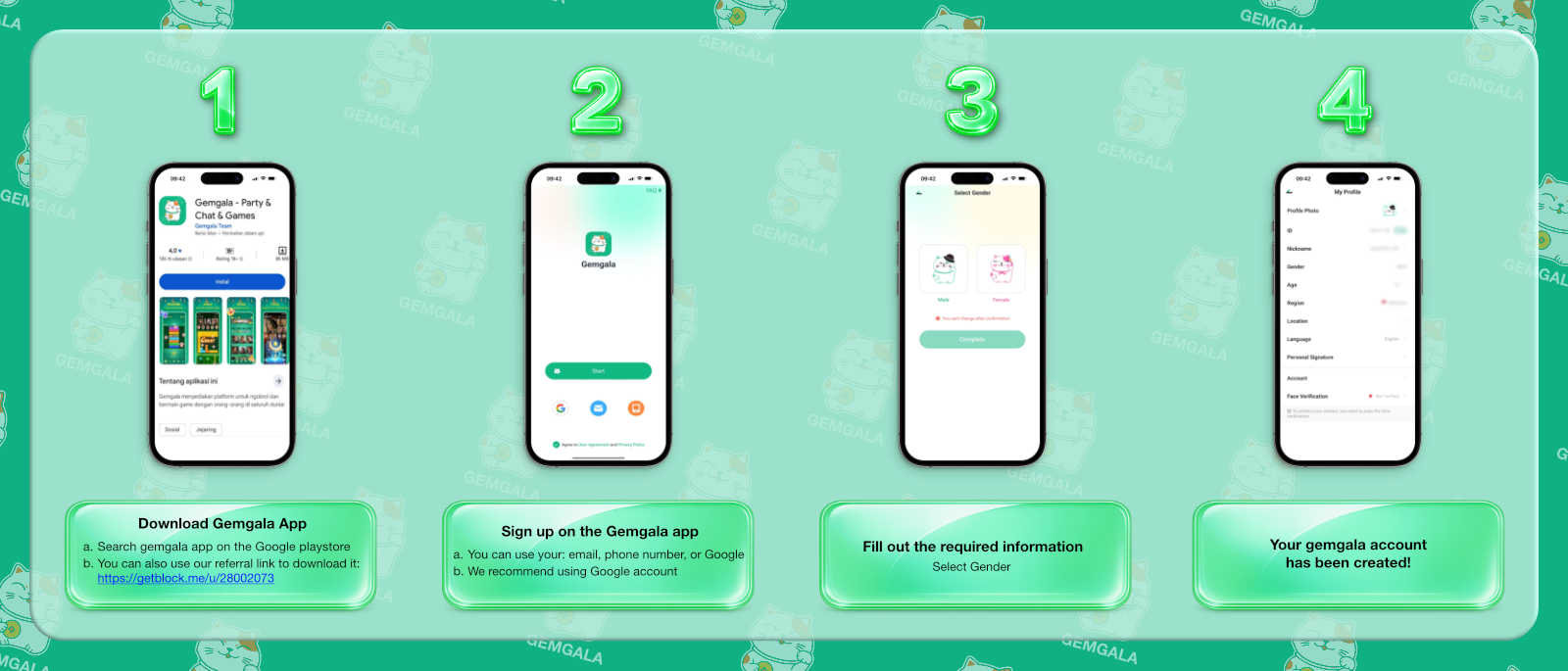
Step 1: Download the Gemgala App.
Use either the Play Store link or our download link
Gemgala is a social entertainment app where you can meet new friends, play games, grow your team, and earn at the same time.
Use either the Play Store link or our download link
Register via Google, email, or phone number. We recommend using Google.
Select carefully, this choice cannot be changed later.
Add your profile photo, nickname, bio, date of birth, and other details.
A Gemgala Host is a user who participates in the platform through livestreams, party, mini games, and host-related activities. This is designed for users who enjoy engaging with an audience.
A Gemgala Agent focuses less on content creation, and more on building a team. Agents invite new users, develop a team, and may earn through the Gemgala agency system.
Go to your Gemgala profile and select Gems.
Open the withdrawal option from the Gems section.
Select MetWallet from the available withdrawal options shown in the current flow.
Use the email address connected to your MetWallet account.
Check your email and enter the code requested by Gemgala.
Complete the authorization process so the wallet can be linked for withdrawal.
The Gemgala App is a social entertainment app built around chat, voice party rooms, interactive games, gifts, and community features. Users can join for entertainment and social interaction, while eligible users can also explore the Host and Agent paths.
You can search for Gemgala on Google Play or use our direct download and registration link.
Install the app, choose an available sign-up method such as Google, email, or phone number, then complete the requested profile information. Some features may require additional verification when you use them.
Gemgala provides different participation paths. Hosts may receive gifts and task rewards, while Agents may earn through invitations, team earning, and applicable commission programs. Earnings vary and are not guaranteed.
Gemgala uses MetWallet. Link your wallet, meet the minimum withdrawal requirement, open the Gems menu, select Withdraw, complete email verification, and authorize the connection. Always follow the latest instructions shown in the app.